A peek at the code
Real snippets, lightly trimmed for length, pulled straight from the things I actually run: Hazel's modules and launcher, this website's own front end, the small Flask services on my VPS, and the deploy script that puts it all live. Plus real screenshots of it running. Nothing here's written for the page; it's all code that's currently doing a job somewhere.
Two scrollable boxes below. The first is Hazel and the bots. The second is the site you're reading right now, which has turned out to have more opinions in it than I expected.
🧠 Hazel, the launcher, and the bots
🧠 Hazel V3 · Command Centre
hazel_launcher.py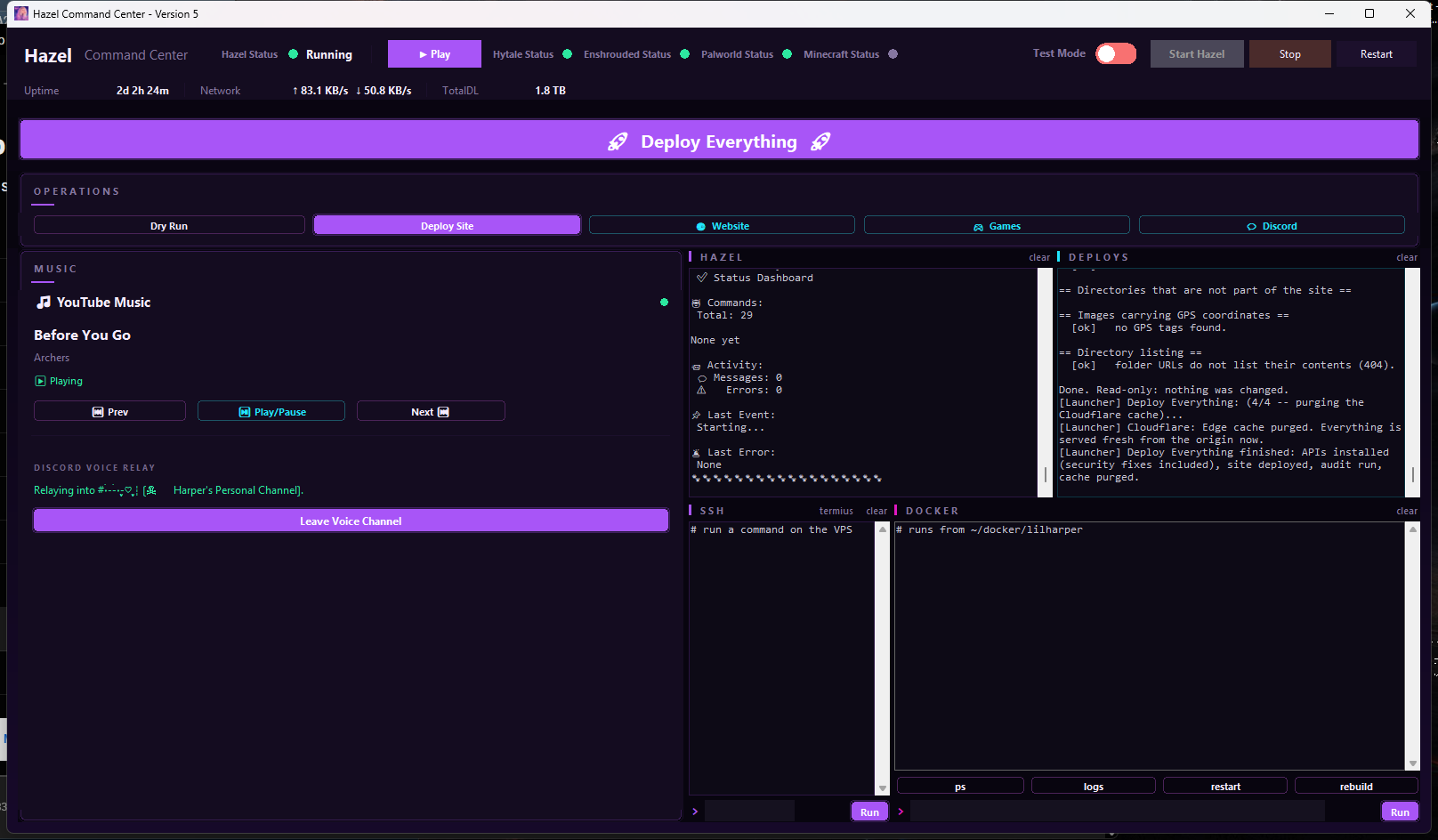
style.css's design tokens (see SITE_THEME below), so the launcher re-tints itself whenever the site does. I trimmed the System card down to just Uptime and Network, because the rest of what it showed was noise I never once acted on. I added Deploy Site, VPS, and Flavi cards so the buttons here do the real thing directly: dry-run and real site deploys, restarting or rebooting the VPS, rolling back to the last real backup, opening Termius, inviting bots. Nothing in this panel is a copy-to-clipboard placeholder anymore. V3 rearranged it again around the thing I do most, which is watch output: the four consoles (Hazel, Deploys, SSH, Docker) now sit in a two-by-two grid taking the whole right half, the SSH and Docker panes take typed commands directly, and I shrank the buttons that used to compete with them for space and moved them left. The command box works out for itself whether what you typed is a shell command for the Debian box, something to run against the Docker container, or PowerShell for this machine, and routes it accordingly. Ambiguous input goes to the VPS, because that's the guess that's right most often. This screenshot is taken from the running window by tools/capture-hazel.ps1, not recreated, which is a small thing that matters: the previous picture on this page was a rebuild from the layout code, and a rebuild can quietly stop matching what the program does.🖥️ SSH & Docker: one command, not a fake terminal
hazel_launcher.pydef run_ssh_command(command_args: list[str], on_line, on_done) -> None:
"""
Runs a local `ssh ...` command (for VPS restart/reboot), streaming
output the same way run_deploy() does. Assumes passwordless key
auth is already set up for debian@<vps> -- same assumption
deploy.ps1 makes for its own scp/ssh calls -- so this never
prompts for a password; if the key isn't set up, ssh will just
fail fast with a clear "Permission denied" line in the console
instead of hanging.
"""
process = subprocess.Popen(
command_args, stdout=subprocess.PIPE, stderr=subprocess.STDOUT,
text=True, encoding="utf-8", errors="replace", bufsize=1,
)
for line in iter(process.stdout.readline, ""):
on_line(line)
process.stdout.close()
on_done(process.wait())deploy.ps1 uses, and the output streams back into the box. Docker's version scopes every command to ~/docker/lilharper and adds quick buttons for the four I run most. For anything that actually needs a live TTY -- sudo prompts, nano, btop -- there's a "termius" link that opens the real thing instead of pretending to be it.🎨 Matching the site's own palette
hazel_launcher.py# Previously an adjustable ThemeDialog with several presets. Replaced
# with one fixed palette, hardcoded from this site's own CSS tokens --
# the launcher matches lilharper.dev instead of being independently
# themeable.
SITE_THEME = {
"bg": "#08050f", # --bg
"panel": "#140c20", # --panel-solid
"text": "#f5ecff", # --text
"accent": "#a855f7", # --purple-bright
"warm": "#ff5ecb", # --pink-bright
"green": "#2de8a0", # --green
}🔁 Rollback: finds the real backup, never guesses
hazel_launcher.py# Two-phase: (1) SSH to the VPS read-only to find the actual most
# recent backup folder, (2) confirm with the real name, then restore.
# Timestamps are yyyyMMdd-HHmmss, so lexical sort == chronological.
latest_backup_command() = "ls -1 ~/docker/lilharper/backups | sort | tail -1"
def _handle_backup_done(self, output: str):
backup_name = output.strip().splitlines()[-1]
if not backup_name:
return self._show_error("No backup found -- only dry-runs have been done.")
self._confirm(f"Roll back to {backup_name}?", on_yes=lambda: self._run_rollback(backup_name))🔌 Launcher → Discord bridge
modules/launcher_bridge.py# The launcher and Hazel are separate processes with no shared
# Discord connection -- every button click just writes one line to
# launcher_queue.json. This loop picks it up and runs the exact same
# logic a real Discord command would.
ACTIONS = {
"checkin": _action_checkin,
"snuggle": _action_snuggle,
"little_mode_on": _action_little_mode_on,
"sleep_mode_on": _action_sleep_mode_on,
"self_care_reminder": _action_self_care_reminder,
}
async def _process_queue(bot) -> None:
entries = _read_queue()
if not entries:
return
# Clear immediately so a slow action can't run twice next tick.
_write_queue([])
for entry in entries:
handler = ACTIONS.get(entry.get("action"))
if handler is None:
print(f"[LauncherBridge] Unknown action '{entry.get('action')}'")
continue
try:
await handler(bot)
except Exception as exc:
print(f"[LauncherBridge] Action failed: {exc}")! command in Discord produce identical results, because they're the same code path with two front doors.🩷 Little Mode toggle
modules/littlemode.pydef is_stranger(user_id: int) -> bool:
"""True for anyone who isn't Harper or Mama."""
return user_id not in (YOUR_USER_ID, CAREGIVER_USER_ID)
async def set_little_mode(bot, enabled: bool) -> None:
"""
Flip Little Mode on/off, persist it, and let Mama know either way.
Shared by !littlemode and the launcher's toggle, so both paths
behave identically.
"""
global _little_mode
_little_mode = bool(enabled)
_write_state(_little_mode)
message = ON_MESSAGE_TO_MAMA if _little_mode else OFF_MESSAGE_TO_MAMA
await send_dm(bot, CAREGIVER_USER_ID, content=message)
confirm = CONFIRM_TO_HARPER_ON if _little_mode else CONFIRM_TO_HARPER_OFF
await send_dm(bot, YOUR_USER_ID, content=confirm)little_mode.json so the toggle survives a Hazel restart mid-regression. While it's on, anyone who isn't Harper or Mama gets a gentle auto-bounce instead of Hazel's normal DM handling.💌 Self-care reminder
modules/selfcare.pydef build_reminder_body(role_mention: str | None = None) -> str:
lines = [
random.choice(WATER_LINES),
random.choice(FOOD_LINES),
random.choice(STRESS_LINES),
random.choice(ENJOY_LINES),
random.choice(KINDNESS_LINES),
]
extra_count = random.randint(0, 2)
if extra_count:
lines.extend(random.sample(EXTRA_LINES, k=extra_count))
random.shuffle(lines)
body = (
f"{random.choice(OPENERS)}\n\n" + "\n".join(lines)
+ f"\n\n{random.choice(CLOSINGS)}"
)
if role_mention:
body += f"\n\n{role_mention}"
return body!selfcare in Discord) posts a freshly-randomized check-in. It's the same five topics every time but different phrasing, so two reminders in a row never read like a copy-paste and stop being easy to ignore.🚀 Deploy Site: pre-flight checks
deploy.ps1# Refuses to deploy if anything's actually wrong -- runs BEFORE any
# file touches the VPS.
$badPatterns = @{
'href="#"' = 'dead link'
'\bTODO\b' = 'TODO marker'
'\bFIXME\b' = 'FIXME marker'
'REPLACE_ME' = 'unfilled value'
}
# Every page must ask for the same ?v= on a shared asset. A mismatch is
# invisible in review and produces the worst bug this site has had:
# correct code that never loads, because most pages still request a
# stale copy.
foreach ($asset in $verRefs.Keys) {
if ($verRefs[$asset].Keys.Count -gt 1) {
Write-Bad "version drift on ${asset}:"
}
}
# A skipped heading level reads as a missing section to a screen
# reader; a page with no <main> gives keyboard users nothing to skip to.
foreach ($m in [regex]::Matches($body, '<h([1-6])\b')) {
$lvl = [int]$m.Groups[1].Value
if ($prev -ne 0 -and $lvl -gt $prev + 1) {
Write-Bad "$($f.Name) skips h$prev -> h$lvl"
}
$prev = $lvl
}
if ($script:Problems -gt 0 -and -not $Force) {
Write-Host " Not deploying. Fix the problems above and run again."
exit 1
}🎮 Archived game-control plumbing
hazel_launcher.pydef enshrouded_action(action: str, timeout: int = 30) -> tuple[bool, str]:
"""POST an action to /api/enshrouded. Returns (ok, message_for_the_log).
WHY THIS IS AN API CALL AND NOT SSH
Enshrouded has a
real blueprint on the VPS (vps/enshrouded_api.py) that owns the
container, validates the action, and keeps a capped audit log of
who did what. Going through it means the launcher is not a second
place that knows how to operate the game server, and it means the
same control surface is available to Hazel and to anything else
later without another SSH path.
"""
config = read_config()
token = config.get("whitelist_api_token", "")
if not token:
return False, "whitelist_api_token is missing from config.json, so the API would reject this."🔐 Archived self-service whitelist
modules/whitelist.py# Standard 8-4-4-4-12 hex UUID
UUID_RE = re.compile(
r"^[0-9a-fA-F]{8}-[0-9a-fA-F]{4}-[0-9a-fA-F]{4}-"
r"[0-9a-fA-F]{4}-[0-9a-fA-F]{12}$"
)
@bot.hybrid_command(name="whitelist")
@commands.cooldown(rate=3, per=60.0, type=commands.BucketType.user)
async def whitelist(ctx, uuid: str = None):
if uuid is None:
await ctx.send("Run /uuid in-game, then `!whitelist your-uuid-here`.")
return
uuid = uuid.strip().lower()
if not UUID_RE.match(uuid):
await ctx.send("❌ That doesn't look like a UUID.")
return
ok, result = await _api_post("/add", uuid)
if ok:
await ctx.send("✅ You're whitelisted! Hop on whenever you like.")🧠 Hazel · help command
discord.py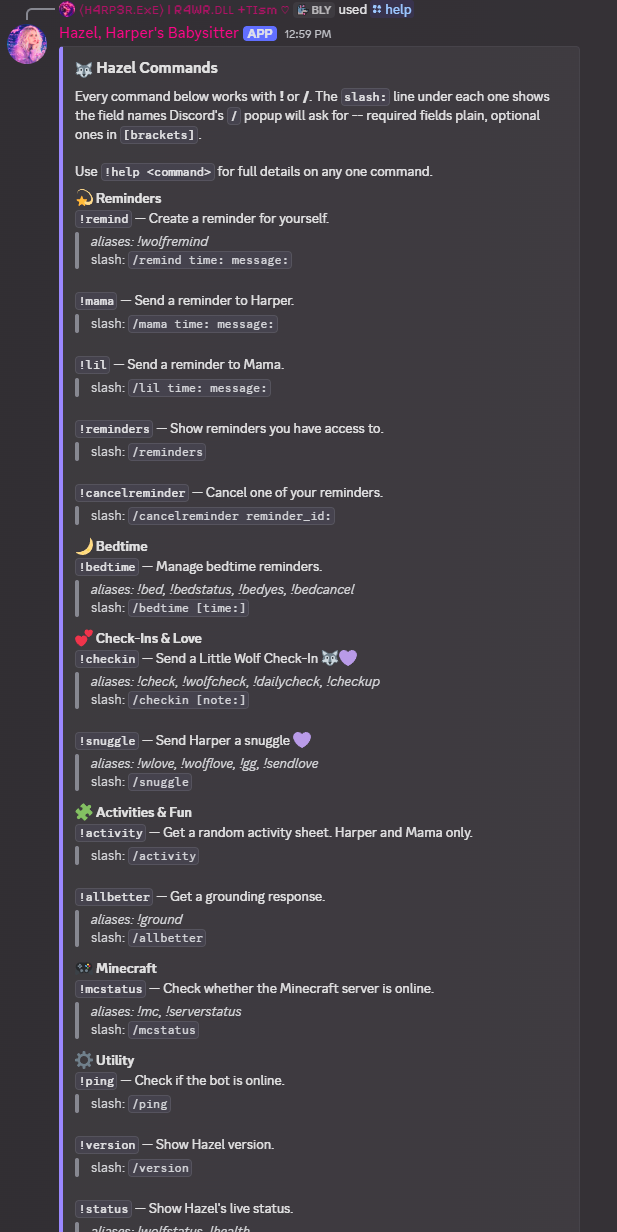
! and /, and shows the exact slash-command signature Discord's popup will ask for. Half the support questions I used to get were people guessing at argument order, so the help output now just tells them.📋 Categorized help embeds
modules/help.py# Hardcoded on purpose: Hazel's commands don't use cogs,
# so there's no automatic grouping to pull from.
CATEGORIES = [
("⚙️ Utility", ["ping", "version", "status", "help"]),
]
def build_overview_embed(bot) -> discord.Embed:
embed = discord.Embed(title=f"🐺 {BOT_NAME} Commands", color=0x8E7DFF)
for category_name, command_names in CATEGORIES:
lines = [_command_line(bot.get_command(n)) for n in command_names if bot.get_command(n)]
if lines:
embed.add_field(name=category_name, value="\n\n".join(lines), inline=False)
return embed🧠 Hazel · live status view
discord.py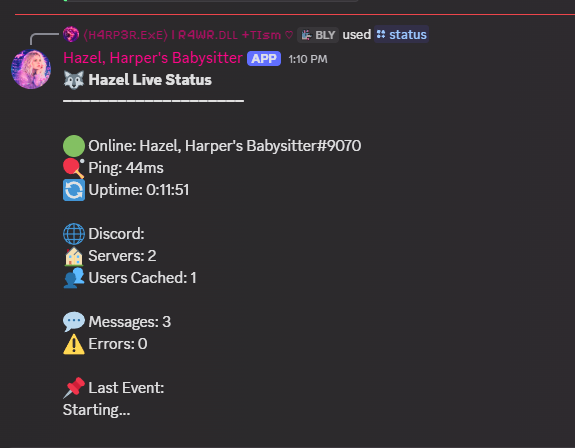
📊 The live console dashboard
modules/status.pydef uptime():
delta = datetime.now() - START_TIME
return str(delta).split(".")[0]
async def update_status(bot):
print(f"🟢 Online: {bot.user}")
print(f"🏓 Ping: {round(bot.latency * 1000)}ms")
print(f"🔄 Uptime: {uptime()}")
print(f"🏠 Servers: {len(bot.guilds)}")
print(f"👥 Users Cached: {len(bot.users)}")
print("📦 Modules:")
for module in LOADED_MODULES:
print(f" ✅ {module}")
print("🤖 Commands:")
print(f" Total: {len(bot.commands)}")
print(top_commands())🐳 Compose stack: reverse-proxied services
docker-compose.ymlservices:
caddy:
image: caddy:2-alpine
ports: ["80:80", "443:443"]
volumes:
- ./Caddyfile:/etc/caddy/Caddyfile
- caddy_data:/data
site-api:
build: ./site-api
# guestbook, blog, reactions and small status routes
restart: unless-stopped🌐 This website, and the box it runs on
Everything above is Hazel. Everything below is this site: the JavaScript running in your browser right now, the small Flask blueprint on my VPS that stores the guestbook, and the PowerShell script that ships the whole thing. Same rule as the rest of the page, nothing here was written to be looked at.
📖 Guestbook: writes that can't half-happen
vps/guestbook_api.py"""
Storage is a single JSON file on disk rather than a database. The
expected volume is a personal site's guestbook, so a table would be
more moving parts than the problem deserves. Writes go through a
temp-file-and-rename so a crash mid-write cannot truncate the file,
and a lock serialises concurrent writers within the process.
"""
def _write(data):
"""Atomic write: temp file in the same directory, then rename."""
directory = os.path.dirname(DATA_FILE) or "."
os.makedirs(directory, exist_ok=True)
fd, tmp = tempfile.mkstemp(dir=directory, prefix=".guestbook-", suffix=".tmp")
try:
with os.fdopen(fd, "w", encoding="utf-8") as fh:
json.dump(data, fh, ensure_ascii=False, indent=2)
fh.flush()
os.fsync(fh.fileno())
os.replace(tmp, DATA_FILE)
except BaseException:
try:
os.unlink(tmp)
except OSError:
pass
raise🛡️ Moderation that doesn't need me awake
vps/guestbook_api.py# Per-IP limits. The browser-side limit stays as a courtesy, but this
# is the one that actually holds, because a visitor cannot clear it.
RATE_LIMIT_MAX = 3
RATE_LIMIT_WINDOW_SEC = 24 * 60 * 60
# Honeypot: a real person never sees or fills this field.
# Answer 200 so a bot cannot tell it was rejected.
if payload.get("website"):
return jsonify({"ok": True, "queued": True})
def _public(entry):
"""Only fields safe to publish. The stored IP is never returned."""
return {
"name": entry.get("name") or "Anonymous",
"message": entry.get("message", ""),
"ts": entry.get("ts", 0),
}_public() exists as its own function instead of the endpoint just returning the entry it already has in hand.🔒 The 18+ gate, and what it honestly isn't
js/agegate.js// WHAT THIS HONESTLY IS AND ISN'T
// This is a static site. There is no server-side session, so this is
// access *friction and record-keeping*, not authorization:
// ✅ The content is genuinely NOT in agere.html / bdsm.html's source.
// View-source, "inspect element", and JS-disabled visitors get
// nothing but the gate.
// ✅ Crawlers that only read the page (and respect the noindex tag)
// get nothing.
// ❌ It cannot stop someone determined. The fragment URL is readable
// in this file, and fetching it directly returns the content.
// This file deliberately does not pretend to be more than it is.content/, and this module only fetches and injects it after someone has filled in the gate. I wrote that comment for future me, because the tempting thing with a feature like this is to describe it as a lock and then quietly forget it isn't one. Making it a real lock means moving the content behind an authenticated endpoint, which is a job for the same small VPS backend that now runs the guestbook.✨ The starfield reads the real palette
js/particles.js/* Colors are read from the real CSS custom properties at runtime
(--purple-bright, --pink-bright, --cyan, --green, --amber), so
switching to the light theme re-tints the effect automatically
instead of drifting out of sync with the rest of the site. */
// Only used if the stylesheet hasn't painted yet when this runs.
const FALLBACK_COLORS = ["#a855f7", "#ff5ecb", "#22e5ff", "#2de8a0", "#ffcc66"];
function readPalette() {
const style = getComputedStyle(document.documentElement);
const colors = ["--purple-bright", "--pink-bright", "--cyan", "--green", "--amber"]
.map(v => style.getPropertyValue(v).trim())
.filter(Boolean);
return colors.length ? colors : FALLBACK_COLORS;
}SITE_THEME in the launcher further up this page, pointed the other way. Nothing hardcodes the purple twice if it can help it: the falling pixels behind this text ask the stylesheet what color they are every time they start, so changing one CSS variable re-tints the background effect, the launcher, and the site in one go. The hex list is only there for the split second before the stylesheet has painted.📡 Reading a status API that keeps moving
js/infra-terminal.js// Written defensively: the backend has changed field names a few
// times, so every value is pulled through several possible keys
// (including one level of nesting under "data") before giving up.
function pick(obj) {
var keys = Array.prototype.slice.call(arguments, 1);
if (!obj || typeof obj !== 'object') return undefined;
var sources = [obj, obj.data, obj.result, obj.status].filter(function (s) {
return s && typeof s === 'object';
});
for (var s = 0; s < sources.length; s++) {
for (var i = 0; i < keys.length; i++) {
var v = sources[s][keys[i]];
if (v !== undefined && v !== null) return v;
}
}
return undefined;
}💻 The infrastructure page's terminal isn't a recording
js/infra-terminal.jsfunction fetchStatus() {
var controller = ('AbortController' in window) ? new AbortController() : null;
var opts = controller ? { signal: controller.signal } : {};
var timer = controller ? setTimeout(function () { controller.abort(); }, 5000) : null;
return fetch('/api/status', opts).then(function (r) {
if (timer) clearTimeout(timer);
if (!r.ok) throw new Error('bad status ' + r.status);
return r.json();
});
}/api/status, live, in your browser. It now keeps two truths separate: the endpoint can be reachable while a retired game workload is offline. If the request fails, the widget also checks whether it's actually running on lilharper.dev before blaming the VPS, because a local preview has no /api to reach and that's not the server having a bad day.🔋 Meters I set by hand, on purpose
js/harper-status.js/* HARPER: THIS IS THE FILE YOU EDIT. Nothing else needs touching.
'updated' is the date you last changed these. The card shows it as
"set by me", so nobody reads these as live sensor data.
Deliberately NOT wired to a fitness tracker or health app: no
sensor can measure a social battery, and labelling a step count as
one would be making data up. These are self-reported on purpose. */
window.LH_STATUS = {
updated: '2026-07-24',
meters: [
{
label: 'Social Battery',
value: 20,
note: 'running low, recharging',
fill: 'social'
},
{
label: 'Isolation',
value: 70,
note: 'mostly keeping to myself lately',
fill: 'sanity'
}
]
};💾 Deploy: back up first, verify after
deploy.ps1Write-Head "Backing up live site on the VPS"
$backupCmd = "mkdir -p $RemoteBase/backups && cp -a $RemoteBase/site $RemoteBase/backups/site-$Stamp"
ssh "${VpsUser}@${TargetHost}" $backupCmd
if ($LASTEXITCODE -eq 0) {
Write-Ok "backed up to $RemoteBase/backups/site-$Stamp"
} else {
Write-Warn "backup command returned $LASTEXITCODE - continuing, but you have no rollback point"
}
Write-Head "Verifying live site"
$resp = Invoke-WebRequest -Uri $SiteUrl -TimeoutSec 10 -UseBasicParsing -ErrorAction Stop
if ($resp.StatusCode -eq 200) {
Write-Ok "$SiteUrl returned 200"
Write-Host " Roll back with:" -ForegroundColor DarkGray
Write-Host " ssh ${VpsUser}@${TargetHost} `"rsync -a --delete $RemoteBase/backups/site-$Stamp/ $RemoteBase/site/`""
}🗂️ One index, three features
js/site-index.js // The index
// id matches <body data-page>. Tags drive related-page scoring
// and search. `boost` hand-picks related pages that tag overlap
// alone wouldn't surface (or wouldn't rank high enough).
var PAGES = [
{ id: 'home', href: 'index.html', ico: '🏠', title: 'Home',
blurb: 'The front door. Featured projects, live infrastructure, and what this place is.',
tags: ['hub'], hideRelated: true },
{ id: 'infra', href: 'infrastructure.html', ico: '🖥️', title: 'Infrastructure',
blurb: 'The live homelab map: VPS, home network, what runs where, and what it all costs.',
tags: ['tech', 'homelab', 'hosting', 'hazel'], boost: ['lab', 'projects'] },
{ id: 'trans', href: 'trans.html', ico: '🏳️⚧️', title: 'Trans',
blurb: 'My transition, honestly told, and what I wish I had known sooner.',
tags: ['identity', 'personal', 'health'], boost: ['about', 'writing'] },
];/ or Ctrl+K, and the "your journey" card in the sidebar. It replaced a pile of hand-maintained "learn more" links that were quietly wrong half the time. One page is deliberately missing from the array: vault.html is a secret, and putting it in the search index would rather defeat the point.🎧 The lofi is synthesized, not streamed
js/lofi.js/* WHAT THIS IS
A small Web Audio loop synthesized live in the browser: a slow jazzy
chord progression through a breathing lowpass filter, over a quiet
vinyl-crackle bed. There is no audio file and no streamed track.
WHY IT'S SYNTHESIZED RATHER THAN A REAL LOFI TRACK
Hosting or hotlinking an actual lofi-hip-hop recording on a public
site is a real licensing question, and not one worth inheriting for
background ambience. Generating it means there's nothing to license,
nothing to attribute, and nothing extra to download. */Everything on this page is code I maintain by myself, for fun, on projects nobody is paying me to ship. If any of it's useful to you, take it. If you spot something wrong in one of these snippets, I'd rather know than not: tell me. The full picture of what runs where is on the Infrastructure page.